SEO Core

SEO CORE APP FEATURES

SEO workflows that move from audit findings to approved action

Explore the product areas that help your team crawl sites, prioritize fixes, map keywords, use AI guidance, and deploy SEO updates with control. Each section shows the actual feature, how it works, and the outcome it supports.

Audit the site
Prioritize the next action
Deploy with guardrails

Interactive product preview

Try SEO Core App

SEO Core is an all-in-one SEO and analytics platform designed to help businesses monitor, optimize, and improve their online visibility. Click the sidebar to explore different tools and workflows including website audits, keyword tracking, SEO deployments, issue detection, reporting, and optimization features using sample project data without connecting to live production websites or APIs.

seocoreapp.com/projectsseocoreapp.com/getting-startedseocoreapp.com/seo-growth-strategiesseocoreapp.com/autopilotseocoreapp.com/crawl-setupseocoreapp.com/crawlerseocoreapp.com/issuesseocoreapp.com/schema-markupseocoreapp.com/keywordsseocoreapp.com/keywords/trackerseocoreapp.com/keywords/researchseocoreapp.com/keywords/listsseocoreapp.com/keywords/domain-rankingsseocoreapp.com/gsc-analyticsseocoreapp.com/content/topical-mapseocoreapp.com/content/editorseocoreapp.com/content/cannibalizationseocoreapp.com/optimized-urlsseocoreapp.com/seo-deploysseocoreapp.com/seo-reports

Projects

Manage project domains, integrations, active workspace selection, and the setup state that powers the rest of SEO Core.

New projectOpen workspace

Google Search Workspace

google.com · Production workspace

Active
GSC connectedGA4 connectedDeploy script live
Edit project info
Integrations
Deploy Script
Invite teammate

Quick setup

google.com

Production workspace

Active

Crawl settings

Website Auditor enabled

Ready

Deploy connection

JavaScript snippet installed

Verified

Active project

Selected

google.com

Integrations

GSC + GA4

2

Tracked keywords

+31

420

Open issues

-6

18

Set up your SEO workflow

Follow the onboarding checklist, learn how Website Auditor, keyword workflows, and deploys connect together, and get first wins faster.

Resume setup

80%

Workflow ready

Checklist

Create project

Complete

Connect Google Search Console

Complete

Run first crawl

Complete

Map priority keywords

Complete

5

Open Autopilot

Recommended next

google.com is ready for Autopilot recommendations.

Open Autopilot

SEO Growth Strategies

Autopilot ranks the next batch from project data, generates with your connected AI provider, then waits for approval.

RefreshStart action

Autopilot ranks the next batch from your project data, then waits for approval.

12 actions
AllFoundationGrowthTechnicalContent
Ready

Improve commercial landing pages

GSC + crawl + keyword gap

HighStart →
Queued

Expand topical coverage

Topical Map clusters

MediumStart →
Ready

Resolve technical blockers

Crawl issues by URL group

HighStart →
Fresh

Crawl data

Latest technical findings

TodayStart →
Synced

GSC data

Clicks, impressions, queries

28dStart →
Synced

Deploy history

Live and staged changes

LiveStart →

Conversations

New
AI SEO Autopilot

1 action blocks

Fix technical issues

2 action blocks

Content growth plan

3 action blocks

Schema deployment

4 action blocks

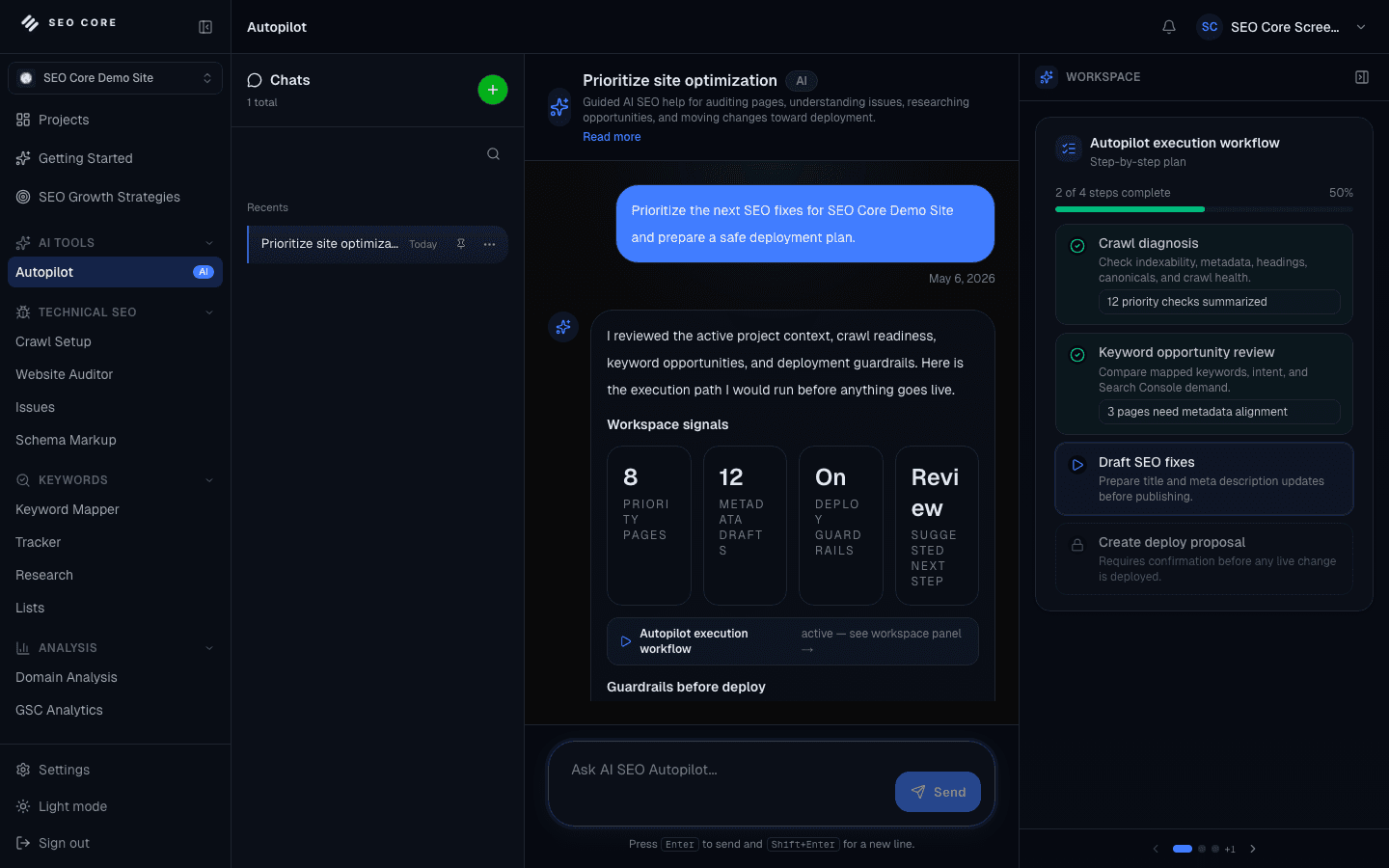
AI SEO Autopilot

Guided AI SEO help for auditing pages, understanding issues, researching opportunities, and moving changes toward deployment.

What should I do next?

I reviewed google.com. Your highest leverage move is to fix crawlable metadata gaps, then deploy schema to priority pages.

Show me the next actions for this week.

Recommended action queue

What should I do next?

Project-aware action planning

Ready

Draft metadata fixes

Titles and descriptions

Review

Research competitor gaps

Keyword and SERP context

Queued
Ask Autopilot about rankings, issues, deployments...

Crawl Setup

Enable or disable Website Auditor and control how google.com is crawled for this project.

Edit setupSave changes
Whitelist the Website Auditor user-agent before running production crawls.

Crawler overview

User agent

seomktool

Start URL

https://google.com

Depth setting

Balanced crawl

Sitemap

Detected

Robots.txt

Accessible

Canonical host

google.com

General

Enable automatic crawling

Daily schedule

Include sitemap

Project crawl behavior

Follow internal links

Project crawl behavior

JavaScript rendering

Project crawl behavior

Max pages: 500
Max depth: 5

Path filters

/search
/business
/ads
/admin
/login
/tmp

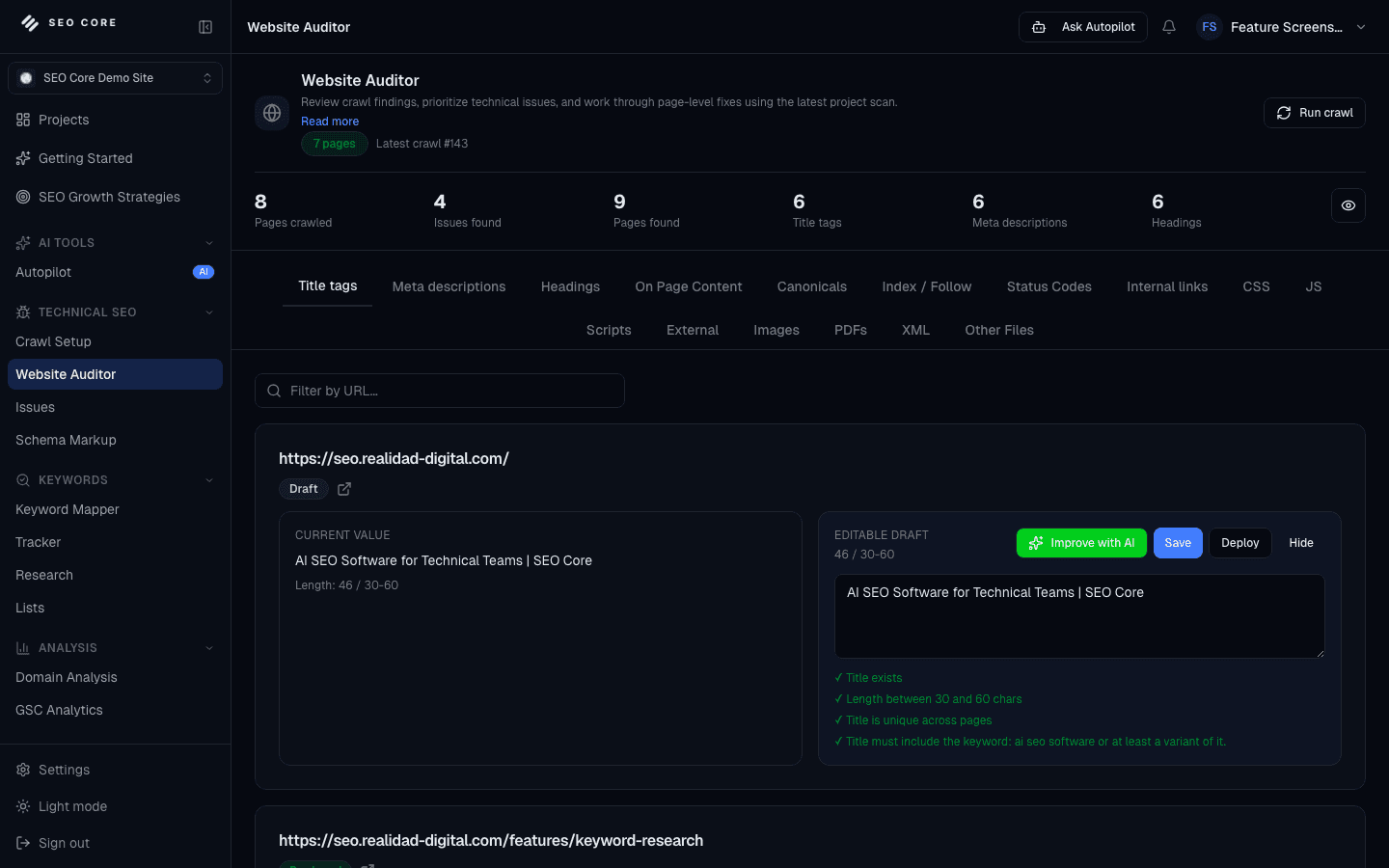
Website Auditor

Audit pages, review issues, and move from technical findings to safe execution.

Run crawlDraft with AI

Pages crawled

+28

142

Issues found

-6

18

Healthy pages

87%

124

TitlesDescriptionsHeadingsCanonicalsStatus CodesInternal Links
URLIssueStatusImpact
Missing product schema24 templates affectedReadyHigh
Duplicate meta descriptions18 URLs affectedDraftedMedium
Slow category templatesCore Web Vitals riskAssignedHigh
/mapsDuplicate title tagReviewMedium

Deploy-ready actions

Product pagesHealthy

68 URLs

Category pagesReview

31 URLs

Blog pagesHealthy

43 URLs

Issues

Group SEO problems by URL, severity, status, and evidence so fixes can be prioritized cleanly.

Refresh issues

Filters

Active18
Critical3
High8
Medium7
Missing metadata11
Search by URL

Title too long

/search/howsearchworks

Active
2 issuesHighView diagnostics

Missing H1

/business

Active
3 issuesMediumView diagnostics

Canonical mismatch

/ads

Fixed
4 issuesLowView diagnostics

Severity

Critical and warning

Active
5 issues2View diagnostics

Status

Active issues

Active
6 issues18View diagnostics

URL search

google.com paths

Ready
7 issues142View diagnostics

Diagnostics

Missing title on /search with crawl evidence, severity, and suggested replacement.

Expected title tag but page returned empty metadata during latest crawl.
FixedHidden

Schema Markup

Validate, generate, and deploy JSON-LD structured data for your pages.

ValidateDeploy
https://google.com/search
Get Schemas

Detected schemas

Organization

Deployed

WebSite

Draft

FAQPage

Draft

Add schema type

Article
Product

Schema editor

@type: Organization
name: Google
url: https://google.com
sameAs: 4 profiles
{"@context":"https://schema.org","@type":"Organization"}

Validation

2 valid1 warning0 errors

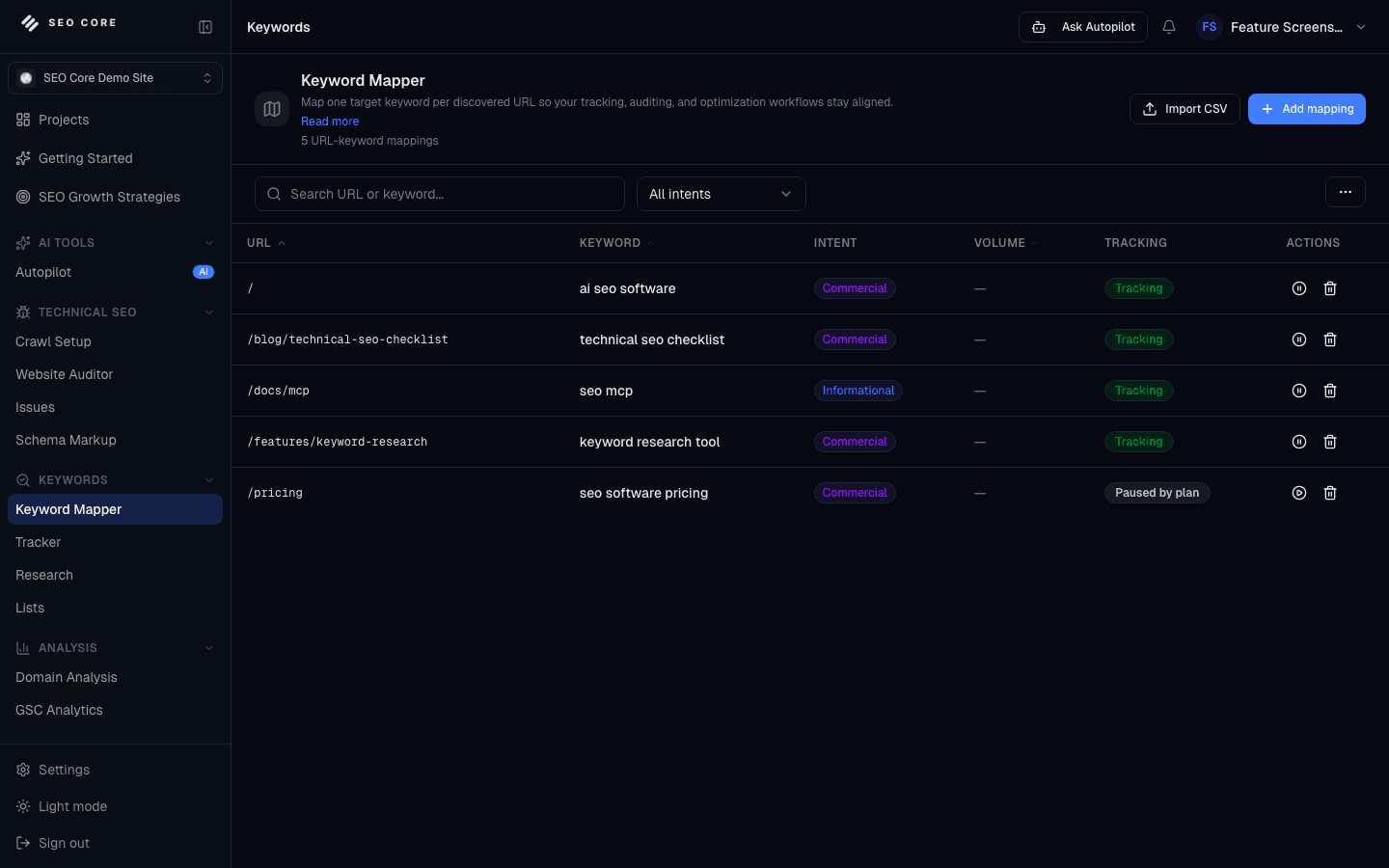
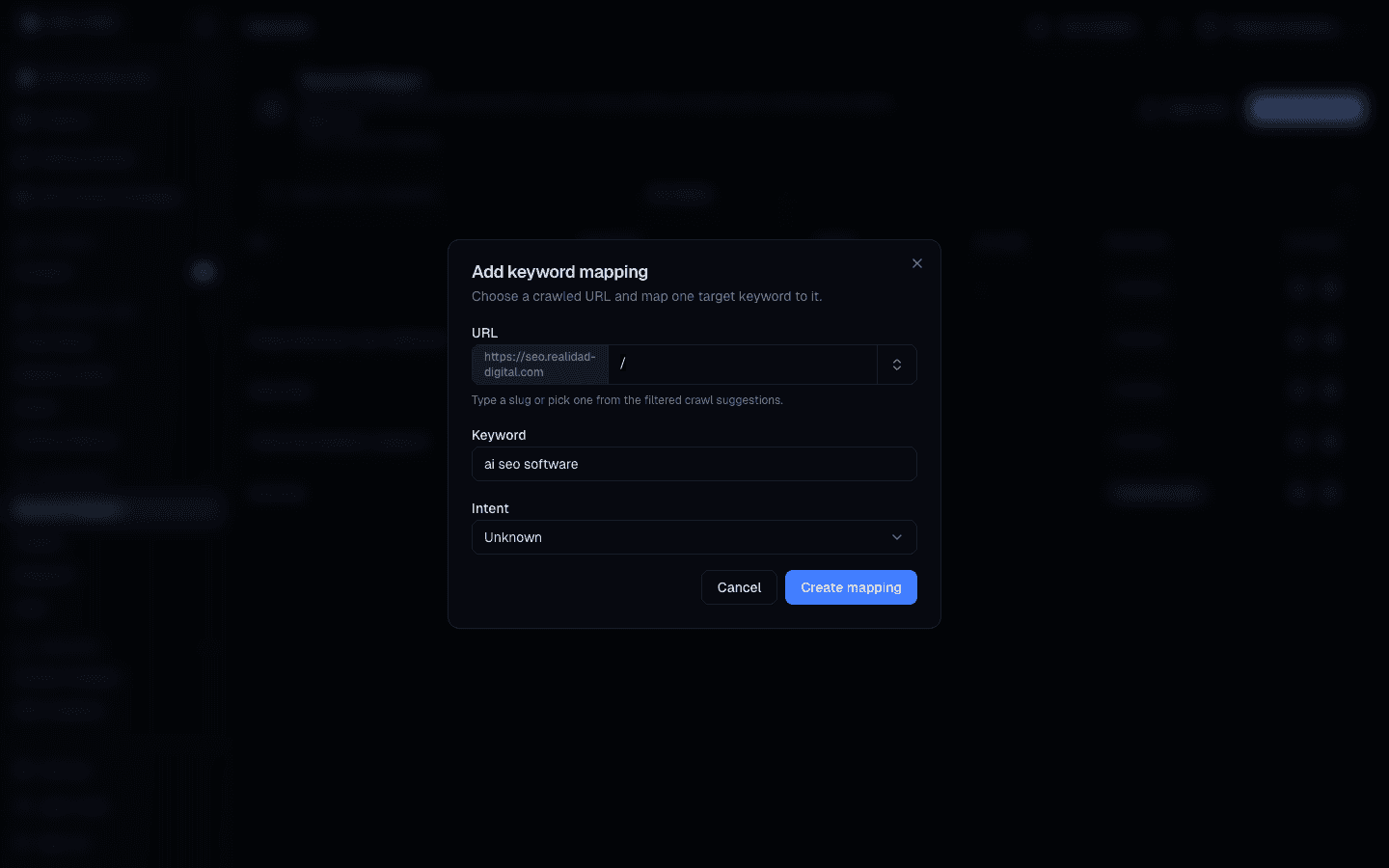
Keyword Mapper

Map one target keyword per discovered URL so tracking, auditing, and optimization workflows stay aligned.

ImportAdd row
Search URL or keyword...
Intent: All

Mapped URLs

+8

31

Unmapped URLs

-5

14

Tracking ready

+9

27

PrimaryContextStatusSignal
/searchgoogle search engineMappedHigh
/businessgoogle business profileMappedMedium
/adsgoogle ads platformTrackingHigh
GSC AnalyticsQuery suggestionsSyncedLive
Domain AnalysisRanking keywordsCachedFree
ResearchSaved ideasReady64

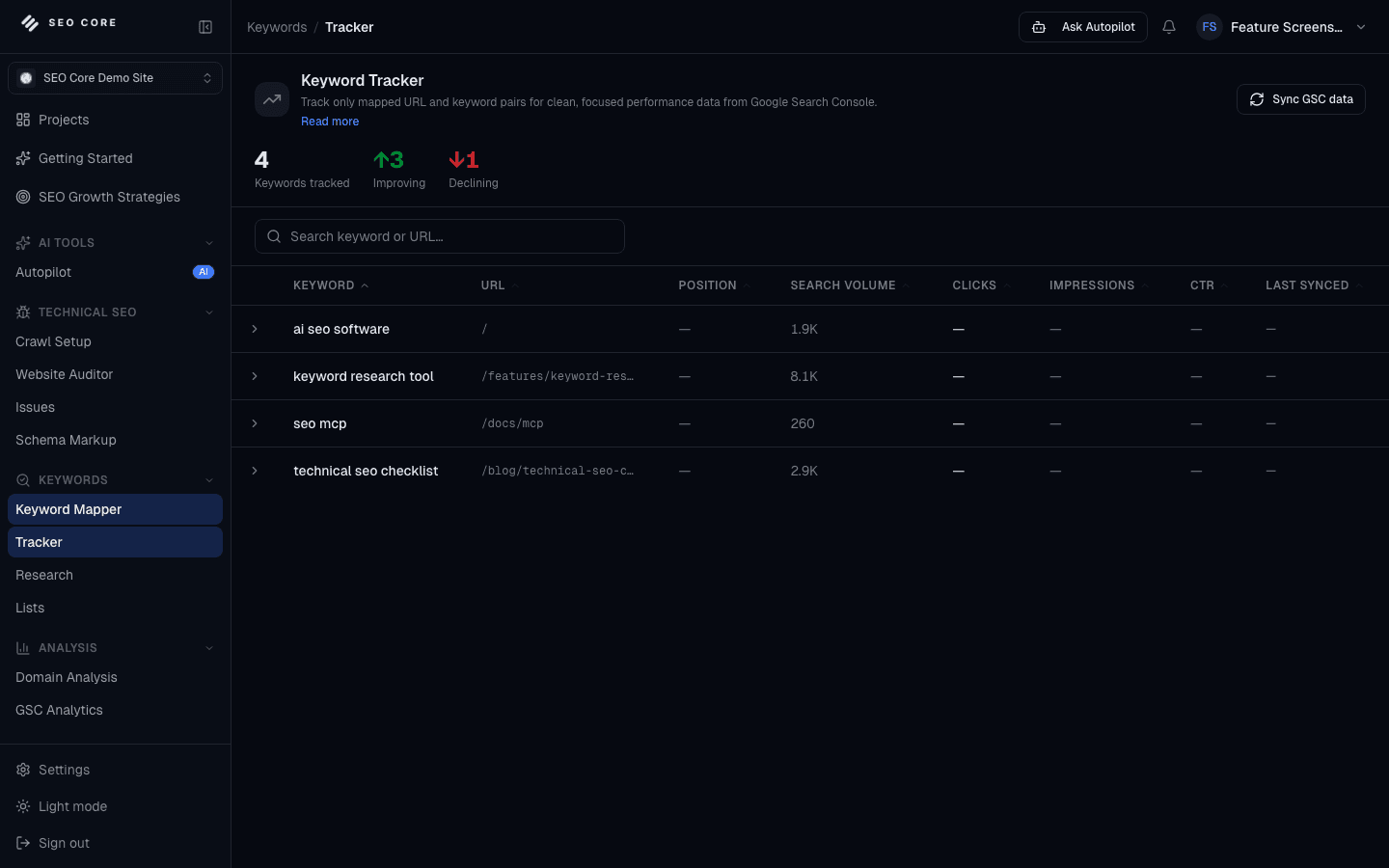
Keyword Tracker

Track only mapped URL and keyword pairs for clean, focused performance data from Google Search Console.

ImportAdd row
Search keyword or URL...
TrackedImprovingDeclining

Tracked terms

+31

420

Top 10 gains

+9

27

Avg position

+16.8%

11.2

PrimaryContextStatusSignal
google search engine/searchPosition 2+1
google business profile/businessPosition 6+3
google ads platform/adsPosition 8+2
Manual sync28-day GSC windowCompleteToday
Auto syncNightly tracking updateQueued12h
New mappingsReady to trackReady5

Keyword Research

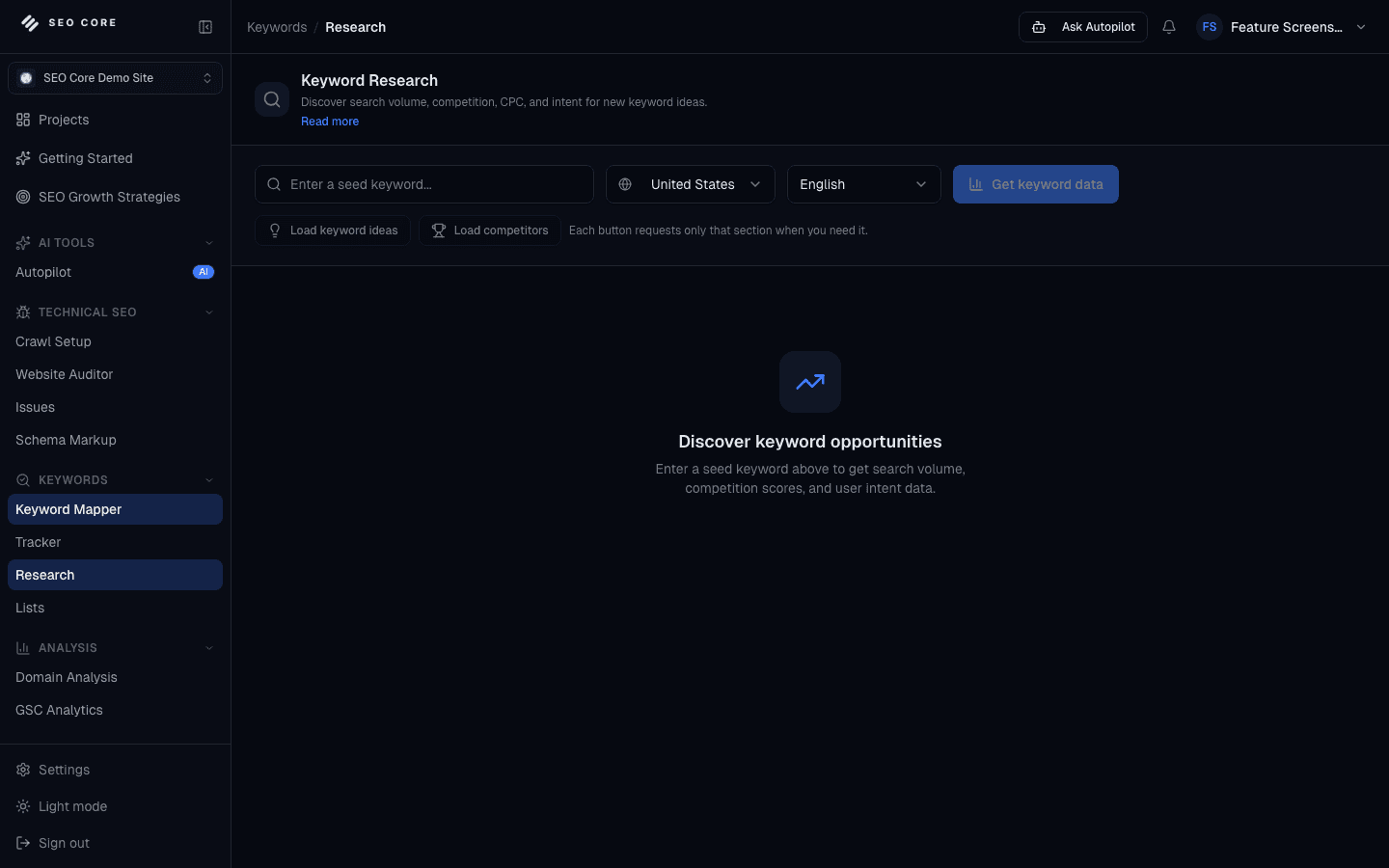
Discover search volume, competition, CPC, and intent for new keyword ideas.

Get keyword data
ai search optimization
United States
English
Load ideas

Ideas found

+21

64

Commercial intent

+8%

38%

Saved keywords

+31

420

Keyword ideas

KeywordIntentStatusVolume
google ai search12.4k monthly searchesSaveHigh
google business seo6.1k monthly searchesMappedMedium
google schema markup3.8k monthly searchesTrackHigh

Competitors

ResultDomainTypeRank
Guides4 top resultsCommonHigh
Tools pages3 top resultsCommonMedium
Support docs2 top resultsMixedLow

Keyword Lists

Consult saved keyword research lists and stored keyword data.

Create new
Search keyword lists...

Google AI opportunities

64 saved keywords

ReadyHigh

Commercial landing pages

38 saved keywords

MappedMedium

Schema targets

21 saved keywords

ReviewMedium

Save from Research

Add new ideas

Ready64

Send to Mapper

Connect to URLs

Ready46

Start tracking

Mapped terms only

Ready27

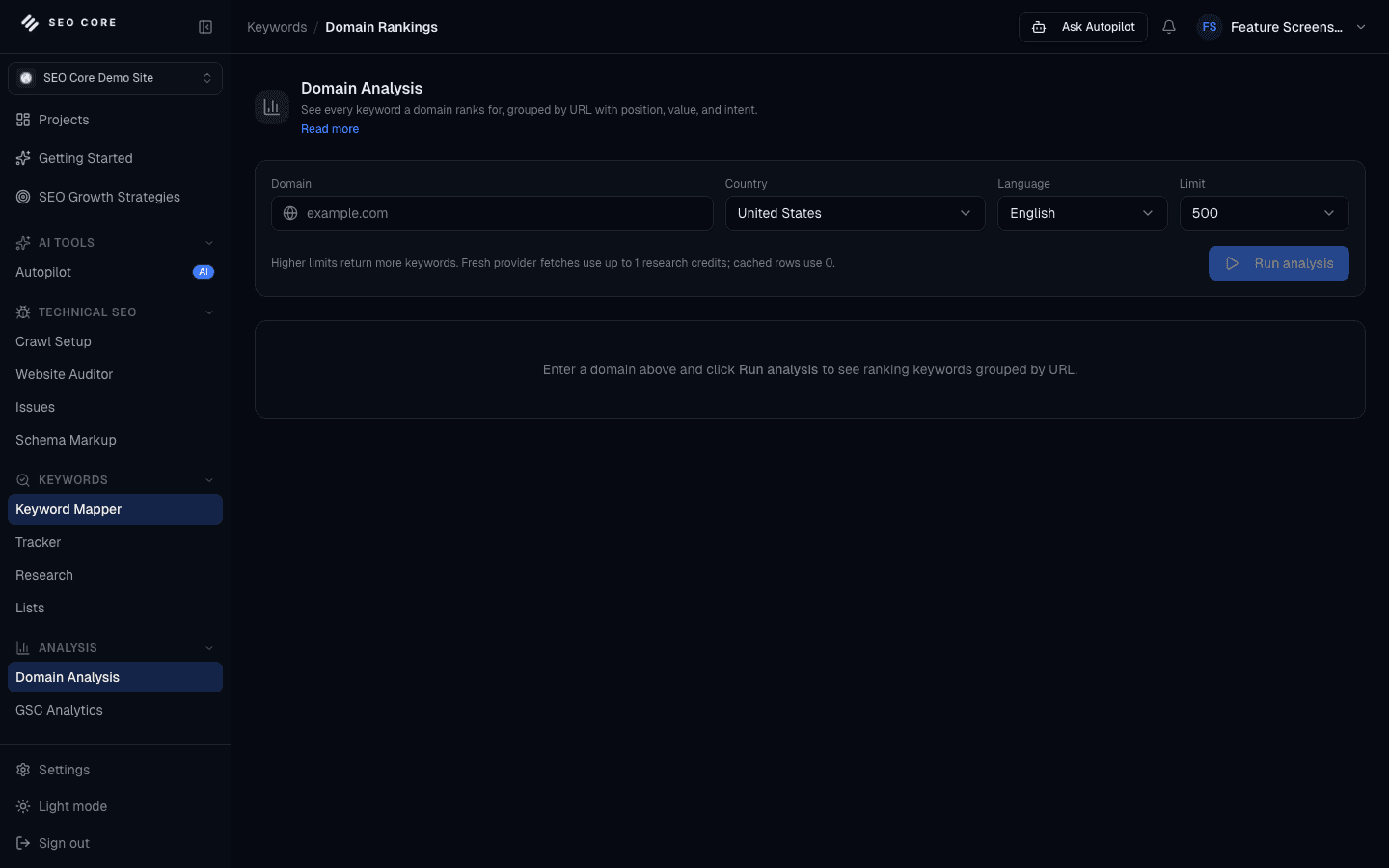
Domain Analysis

See every keyword a domain ranks for, grouped by URL with position, value, and intent.

Run analysis
google.com
United States
English
5,000 rows

Ranking keywords

+7%

18.4k

URL groups

+24

312

Commercial terms

+11%

2.1k

Per-URL statsPer rankingAll keywords
URLTop keywordStatusValue
google.com/searchSearch product keywordsTop 3High
google.com/businessLocal business termsTop 10Medium
google.com/adsPaid media termsTop 10High
bing.comSearch competitorQueuedNext
yahoo.comSearch competitorCachedFree
duckduckgo.comSearch competitorCachedFree

GSC Analytics

Analyze queries, pages, devices, and opportunities from connected Search Console data.

Load dataRefresh
Last 28 days
Device: All
Filters

https://google.com · cached 8 min ago

Clicks

+31.5%

162.3k

Impressions

+28.6%

3.4M

CTR

+8.3%

4.76%

Avg position

+16.8%

11.2

Performance trend

ClicksImpressionsCTR
desktop 92k clicksmobile 61k clickstablet 8k clicks
PagesPositionsQueriesDiscovery
PageClicksStatusPosition
google ai/searchRising+18%
google business/businessStable+4%
google ads/adsOpportunityLow CTR
MobileSearch traffic71%+9%
DesktopSearch traffic25%+3%
TabletSearch traffic4%0%

Topical Map

Turn one primary keyword into semantic topic clusters you can inspect and send into content creation.

Create new
Search topical map...

AI search experience

Google AI, answer engines, citations

ReadyHigh

Business profile optimization

Local visibility cluster

ReadyMedium

Structured data coverage

Schema and rich results

ReviewMedium

Research

Primary keyword input

Done1

Clusters

Vectorizer grouped

Done6

Content Editor

Draft next pages

Ready12

Content Editor

Write, score, and optimize keyword-backed content drafts with benchmark guidance and internal links.

New content editor
Search drafts...

Google AI search guide

Informational article

Google Business SEO

Landing page draft

Schema for Google surfaces

Article draft

Editor

Google AI search guide

Google search visibility now depends on classic rankings, structured data, and answer-engine citations.

Teams can improve outcomes by mapping pages to intent, strengthening schema, and measuring content quality.

Optimization panel

82

Content score

Topic authorityOpen

Add related entities

Internal linksOpen

3 missing links

ReadabilityGood

Shorten sections

Cannibalization Analysis

Find URLs that compete for the same search intent using Search Console data.

Refresh
Search URL or query
Status: All
Page type: All

Query groups

-2

5

Competing URLs

Review

14

Primary pages

Selected

5

google ai search

/search and /ai

Competing
/search1,284 clickspos 3.8Primary

business profile

/business and /maps

Review

google ads support

/ads and /support

Stable

Retarget URL

Assign primary page

Ready

Merge content

Combine overlap

Review

Internal links

Clarify priority

Ready
Page 1 of 3
PreviousNext

Optimized URLs

Review every optimized URL, the SEO box type that changed, and the latest deploy timestamp.

View deploys
Search URL, type, or optimized text
All types
All statuses
URLOptimized boxStatusLatest update
/searchTitle and descriptionLiveToday
/businessHeading and schemaLive2d
/adsMeta descriptionDisabledPaused
MetadataTitle and description12+4
SchemaJSON-LD blocks7+3
ContentOn-page changes5+1

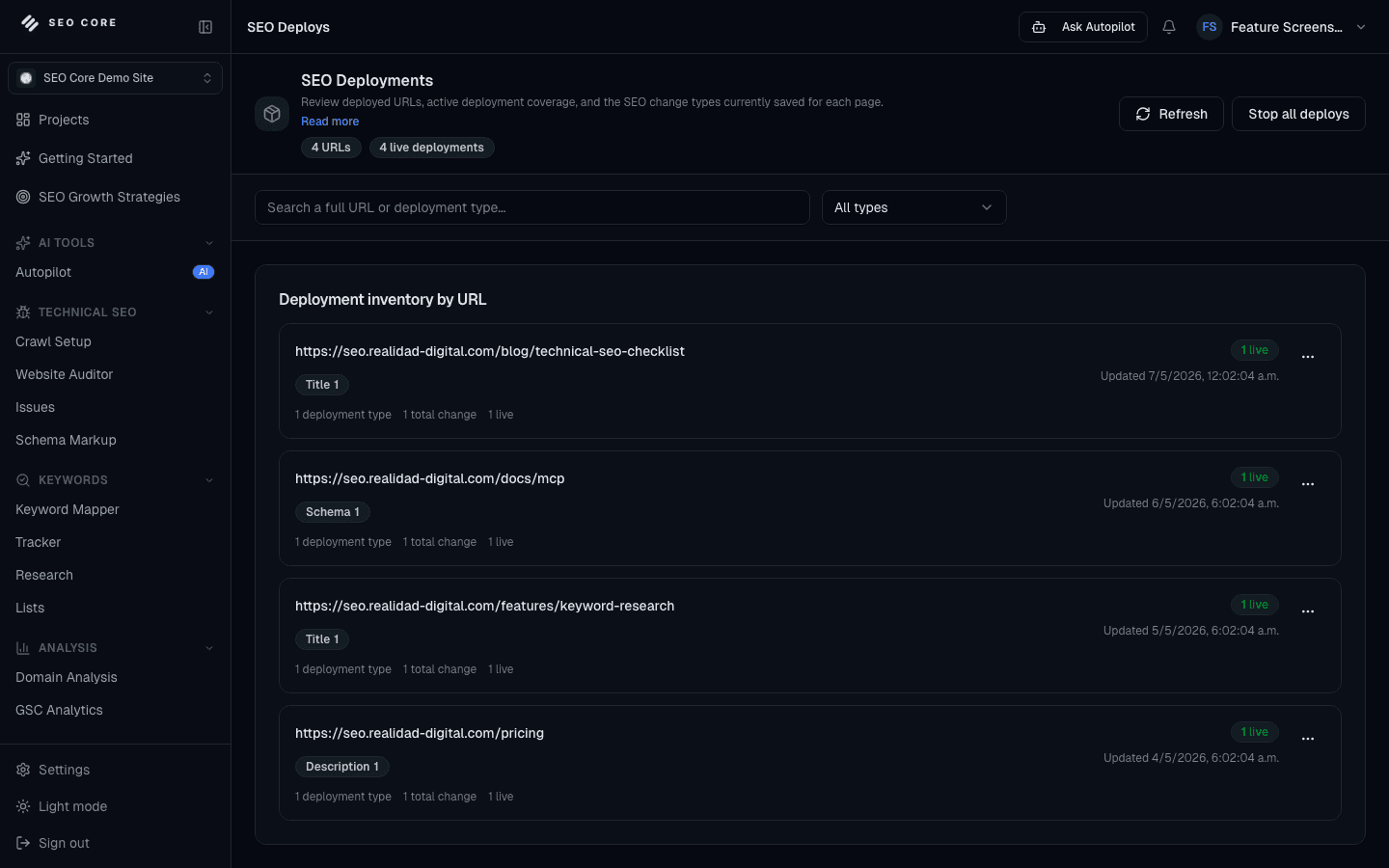
SEO Deployments

Review deployed URLs, active deployment coverage, and SEO change types currently saved for each page.

RefreshStop all deploys
Search a full URL or deployment type
All types
Live

Active deploys

+2

5

Disabled

Paused

2

Latest version

Today

v18

URLDeploy typeStatusVersion
/searchTitle + descriptionLivev18
/businessFAQ schemaLivev17
/adsMeta descriptionDisabledv14
Version historyEvery change trackedOnSafe
RollbackDisable without deletionReadySafe
VerificationScript status checkedPassLive

Deployment details

Current live content: title tag v18
Latest saved content: schema block v17

SEO Reports

Generate executive and technical SEO reports with performance, deployment, and issue context.

Generate report

Reports

+3

9

Executive summaries

+2

6

Technical exports

+1

3

Reports

May SEO Executive Summary

Performance + deploys

Ready

Technical Audit Report

Issues + crawl context

Draft

Deployment Impact Report

Versioned changes

Shared

google.com — Executive Report

Organic visibility improved after deployment coverage expanded across priority pages.

Top Keywords

420

Issues closed

18

SignalContextStatusImpact
PerformanceGSC and GA4SyncedLive
DeploymentsLive change historySyncedLive
IssuesOpen and fixed workSynced18

01 · Keyword Research

Keyword Research for Faster SEO Planning

Move from keyword discovery to decision-ready opportunities faster.

Discover search opportunities, qualify them with clearer business context, and turn research into a plan your team can use.

Simple workflow

Turn early keyword discovery into a clear growth plan your team can align on quickly.

Frame strategic themes

Start with focused opportunity themes that match your category and commercial goals.

Qualify opportunity depth

Prioritize terms with stronger upside potential and clearer execution value.

Shape decision-ready clusters

Convert ideas into structured groups that support faster planning cycles.
Explore feature
Keyword Research interface

02 · Domain Analysis

Domain Analysis that Connects GSC Signals with SERP Opportunity

Understand where your domain can grow next with GSC and SERP context.

Review domain performance, Search Console evidence, and SERP context in one workflow so your team can find the pages and queries most worth acting on.

Simple workflow

Understand domain performance with search data and SERP context in one easy planning view.

Connect live performance

Bring Search Console clicks, impressions, positions, and page signals into the same workspace.

Compare SERP opportunity

Review ranking context and competing results to see where the domain can gain visibility.

Spot priority gaps

Find pages, queries, and themes that deserve attention before work spreads across too many tools.

Explore feature
Domain Analysis interface

03 · Keyword Mapper

Keyword Mapper for Clearer SEO Positioning

Connect search opportunities to the right URLs before execution starts.

Map target keywords to the right URLs, avoid cannibalization, and keep on-page optimization priorities clear.

Simple workflow

Create a sharper SEO targeting blueprint that keeps pages, priorities, and teams aligned.

Define priority assets

Select the pages that matter most for your next visibility growth phase.

Assign strategic targets

Connect each page to high-value keyword directions with stronger clarity.

Refine market coverage

Reduce overlap and tighten focus so every page supports a distinct opportunity.

Explore feature
Keyword Mapper interface

04 · Cannibalization Analysis

Cannibalization Analysis that Protects Your Most Important Pages

Detect keyword overlap and clarify which page should own each intent.

Find overlapping URLs, compare page roles, and resolve keyword conflicts before similar pages compete against each other in search.

Simple workflow

Find keyword and URL overlap early so your best pages support each other instead of competing.

Group overlapping targets

See when multiple URLs are chasing the same intent, query set, or content opportunity.

Compare page roles

Review mapped keywords, performance signals, and content focus to decide which URL should lead.

Resolve conflicts

Clarify consolidation, internal linking, content edits, or noindex decisions with a cleaner action path.

Explore feature
Cannibalization Analysis interface

05 · Keyword Tracker

Keyword Tracking Connected to Real Page Performance

Track the right keywords and keep performance changes visible.

Monitor rankings, connect tracked keywords to real pages, and keep your team focused on movement that matters.

Simple workflow

Keep performance momentum visible so your team can act sooner on what drives growth.

Set high-impact targets

Focus tracking on the terms tied to your strongest business potential.

Monitor movement trends

Follow directional performance signals to keep decisions timely and precise.

Highlight strategic shifts

Spot emerging gains and risk zones before they affect larger outcomes.

Explore feature
Keyword Tracker interface

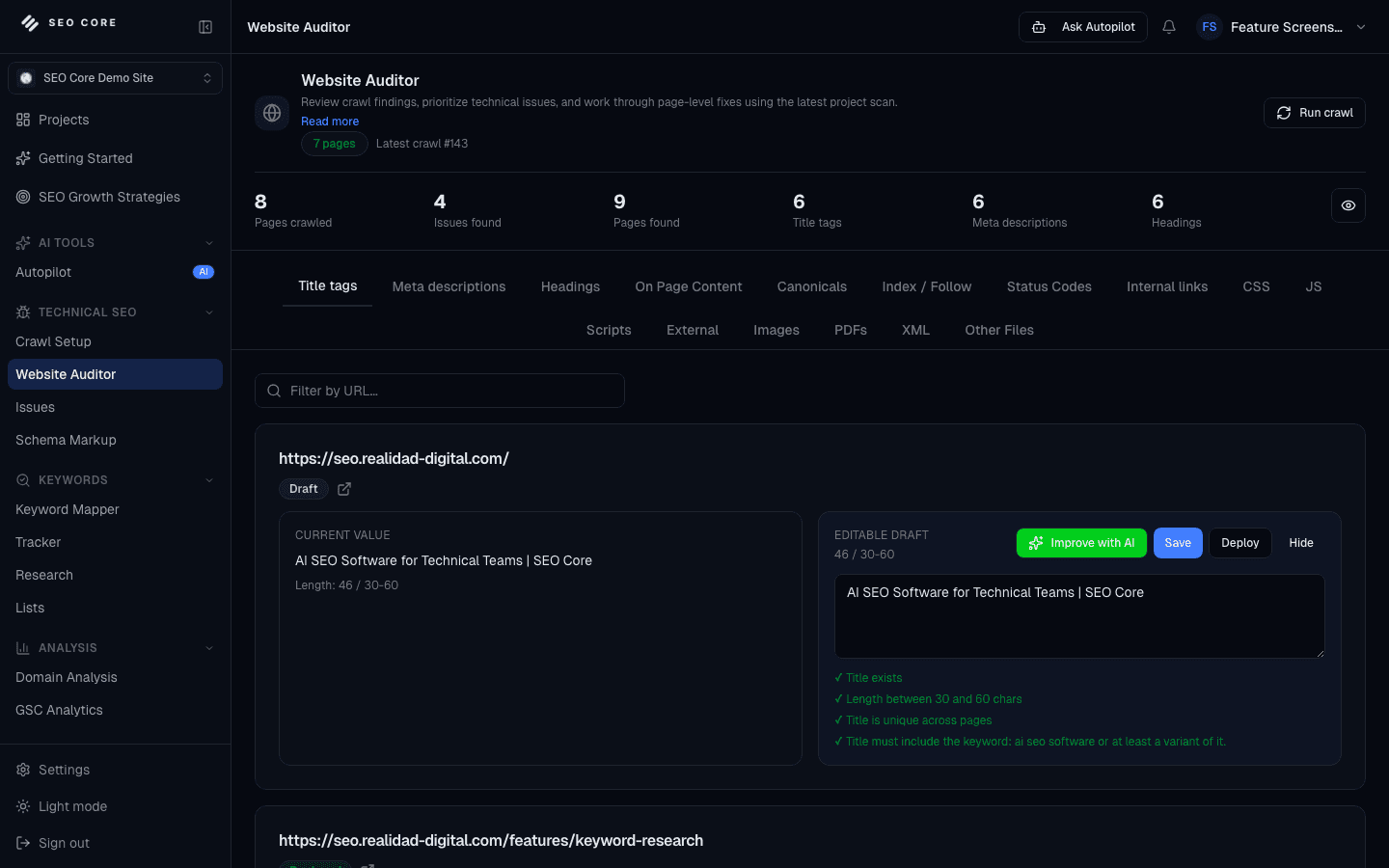
06 · Website Auditor

Website Auditor for Technical SEO Fixes

Crawl pages, review issues, and move from technical findings to safe execution.

Audit site structure, discover technical SEO gaps, and give your team a clearer path to fix crawl and indexation blockers.

Simple workflow

Build a stronger technical SEO foundation with a consistent, scalable site quality lens.

Launch technical visibility

Create a full-picture view of site quality factors that influence SEO confidence.

Surface friction points

Bring attention to areas that can slow discoverability and growth consistency.

Prioritize with confidence

Direct team effort toward the technical actions with the clearest upside.

Explore feature
Website Auditor interface

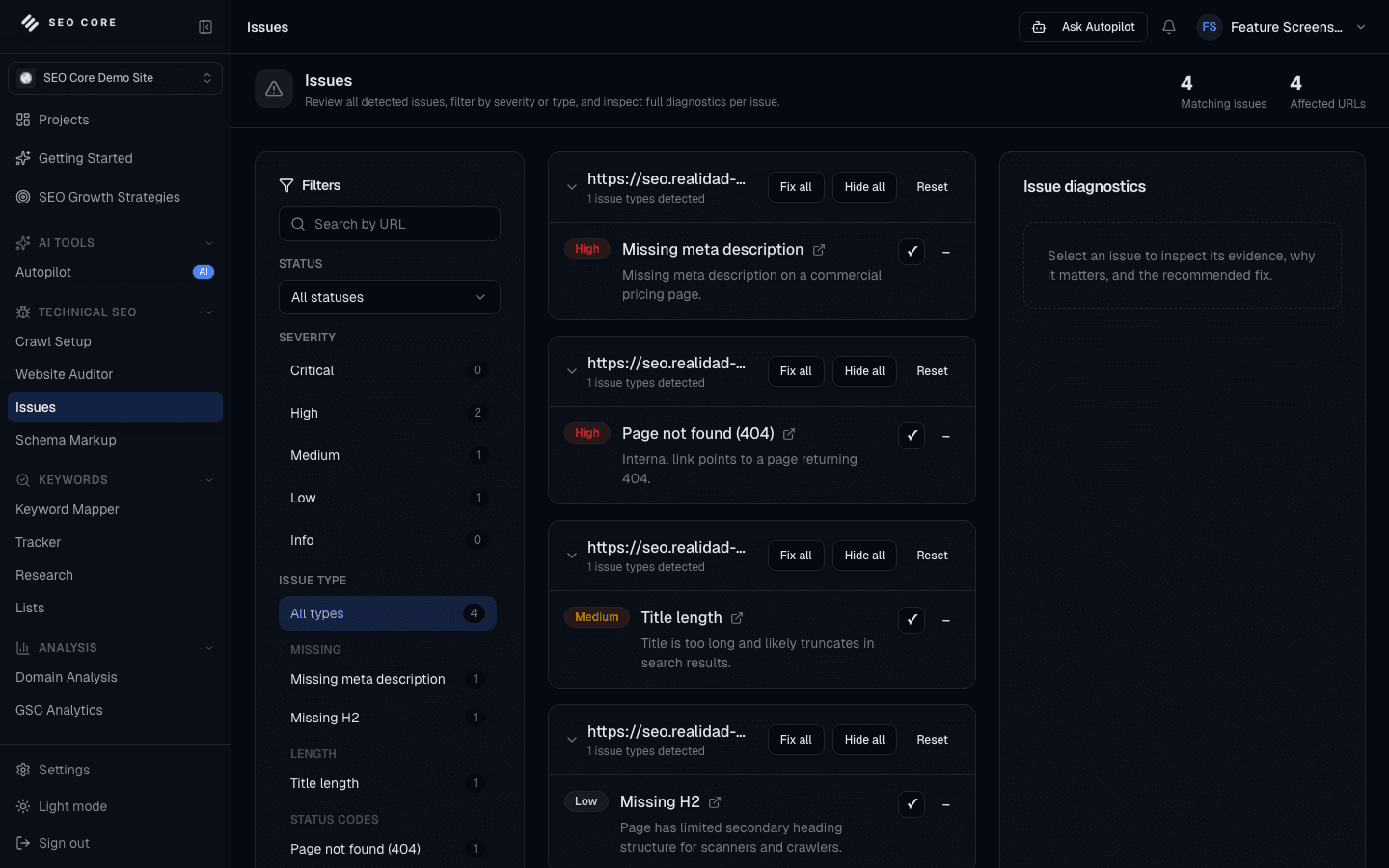
07 · Issues

Issues Management for Prioritized SEO Fixes

Centralize SEO blockers and turn them into a focused action queue.

Find, group, and prioritize SEO issues by impact so teams resolve the most important problems first.

Simple workflow

Turn scattered SEO blockers into a focused action queue that keeps teams moving.

Centralize critical signals

Capture priority SEO concerns in one operational view for faster decisions.

Rank by execution impact

Organize work around what can improve visibility momentum most effectively.

Coordinate resolution flow

Give each stakeholder a clearer role in a shared fix-and-progress cycle.

Explore feature
Issues interface

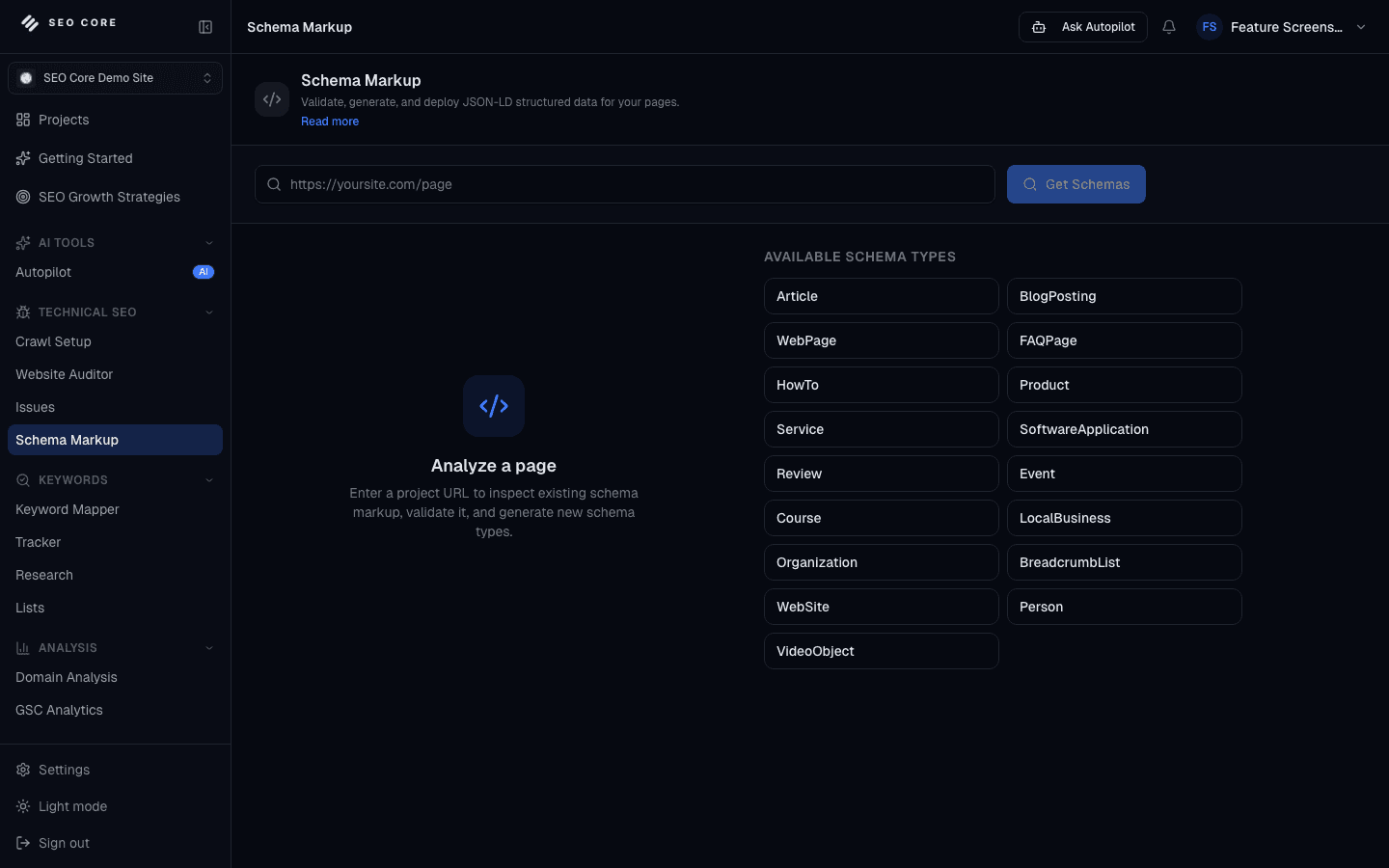
08 · Schema Markup

Schema Markup Workflows for Deploy-Ready Structured Data

Strengthen search presentation with guided structured-data workflows.

Generate, validate, and prepare deploy-ready schema markup with a guided workflow instead of hand-editing JSON-LD.

Simple workflow

Strengthen search presence with a structured data workflow designed for clarity and scale.

Select visibility opportunities

Identify where enhanced search presentation can deliver stronger impact.

Shape structured experience

Organize markup direction to support a cleaner search footprint.

Align implementation flow

Keep SEO and technical teams coordinated around one rollout standard.

Explore feature
Schema Markup interface

09 · Content Editor

Content Editor for Faster, More Controlled SEO Optimization

Edit SEO content with guidance that connects search intent, page context, and deployment.

Improve metadata, headings, page sections, and internal linking with project-aware guidance that keeps writing work connected to SEO execution.

Simple workflow

Edit SEO content with focused guidance that connects page intent, SERP context, and optimization quality.

Open the page context

Start with the URL, target keyword, crawl evidence, and competitor clues your editor needs.

Improve on-page coverage

Tighten headings, metadata, internal links, entities, and content sections with guided suggestions.

Draft faster with control

Use AI-assisted recommendations without losing the specialist review needed for quality.

Explore feature
Content Editor interface

10 · Technical Reports

Technical Reports that Turn SEO Progress into Clear Decisions

Create clearer technical SEO reports without rebuilding the story from exports.

Package crawl health, issue progress, rankings, deployments, and next actions into reports that specialists, executives, and clients can use.

Simple workflow

Turn technical progress into clear reporting that executives, clients, and specialists can understand.

Collect the evidence

Pull crawl health, issue trends, rankings, deployment activity, and project momentum into one report.

Explain impact clearly

Translate technical findings into priority, risk, progress, and next-step language stakeholders can use.

Share focused summaries

Create cleaner technical and executive views without rebuilding reports manually each cycle.

Explore feature
Technical Reports interface

11 · Deployments

SEO Deployments with Version Control and Rollback

Move SEO updates live without losing governance or visibility.

Publish SEO updates with version control, safer approvals, and rollback-ready execution for titles, descriptions, and headings.

Simple workflow

Move SEO updates live with a controlled release model built for confidence at scale.

Prepare approved updates

Package high-priority SEO improvements in a clean release-ready flow.

Coordinate stakeholder timing

Align launch cadence across marketing, SEO, and technical ownership.

Launch with governance

Keep live changes structured under a safer, more auditable execution model.

Explore feature
Deployments interface

12 · AI Integration

AI-Assisted SEO Workflows with User-Owned Model Access

Use your own AI stack to accelerate SEO work without losing control.

Bring your own AI provider, generate optimization drafts safely, and keep SEO production inside a controlled workflow.

Simple workflow

Accelerate SEO production with AI-assisted workflows while preserving quality and control.

Activate AI workflow mode

Bring AI support into your operating stack for faster strategic output.

Guide premium draft quality

Use structured prompts and direction to keep language sharp and aligned.

Streamline team throughput

Reduce production friction so specialists can focus on higher-value decisions.

Explore feature
AI Integration interface

13 · AI SEO Autopilot

AI SEO Autopilot for Evidence-Based SEO Actions

Use AI guidance to understand priorities, draft fixes, and prepare safer SEO actions.

Turn crawl findings, keyword signals, reports, and deployment history into guided SEO actions your team can review, approve, and move forward.

Simple workflow

Use a project-aware AI workspace to understand what is blocking growth and move the next SEO action forward with evidence.

Read project context

Autopilot anchors each answer in crawl findings, keyword data, deployment history, and active project settings.

Build the action path

It turns scattered SEO signals into a pipeline with next steps, blockers, and evidence for each recommendation.

Prepare safe updates

Generate drafts for metadata, headings, content, keyword actions, or deployment proposals before anything goes live.

Explore feature
AI SEO Autopilot interface

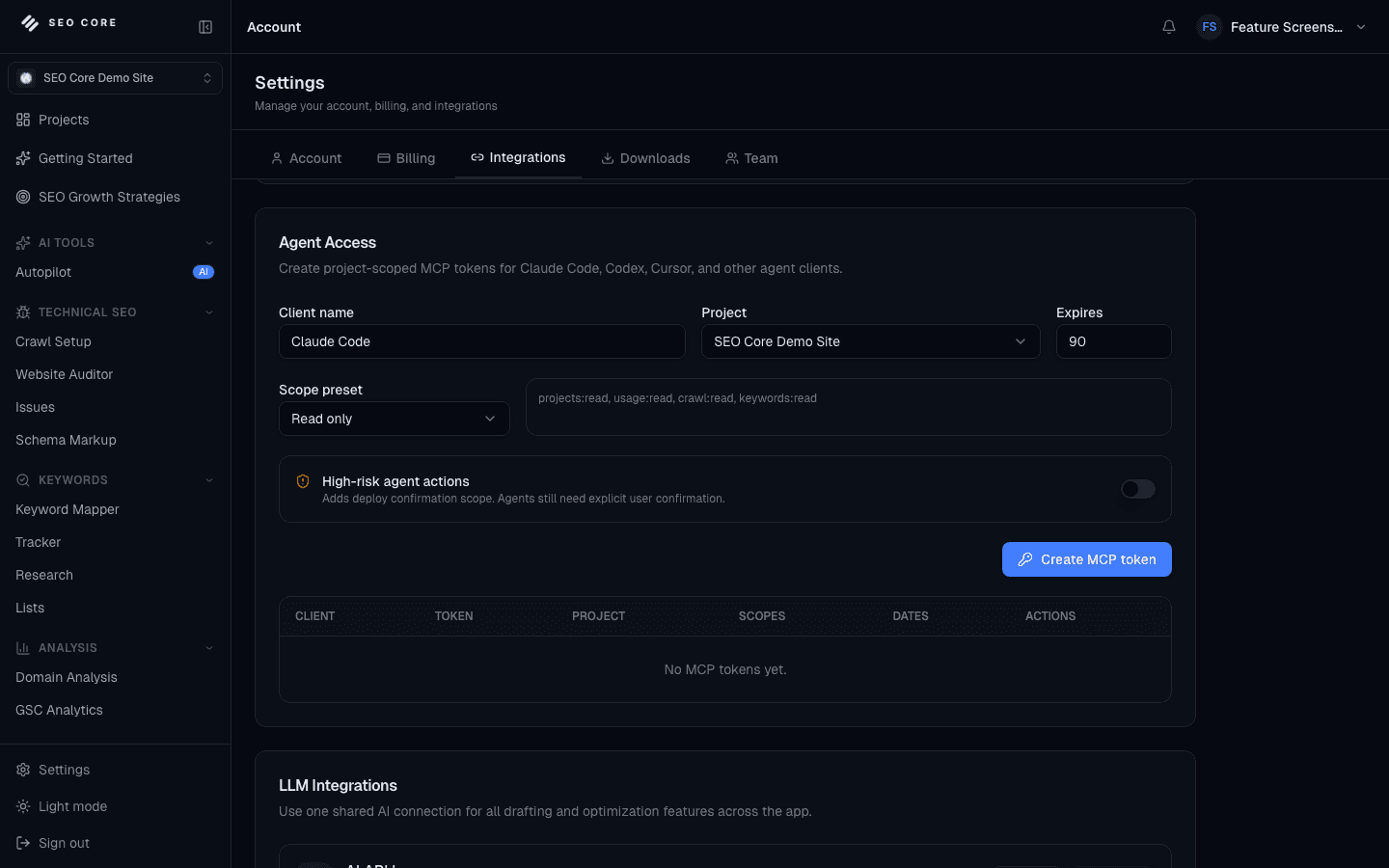
14 · SEO Core MCP

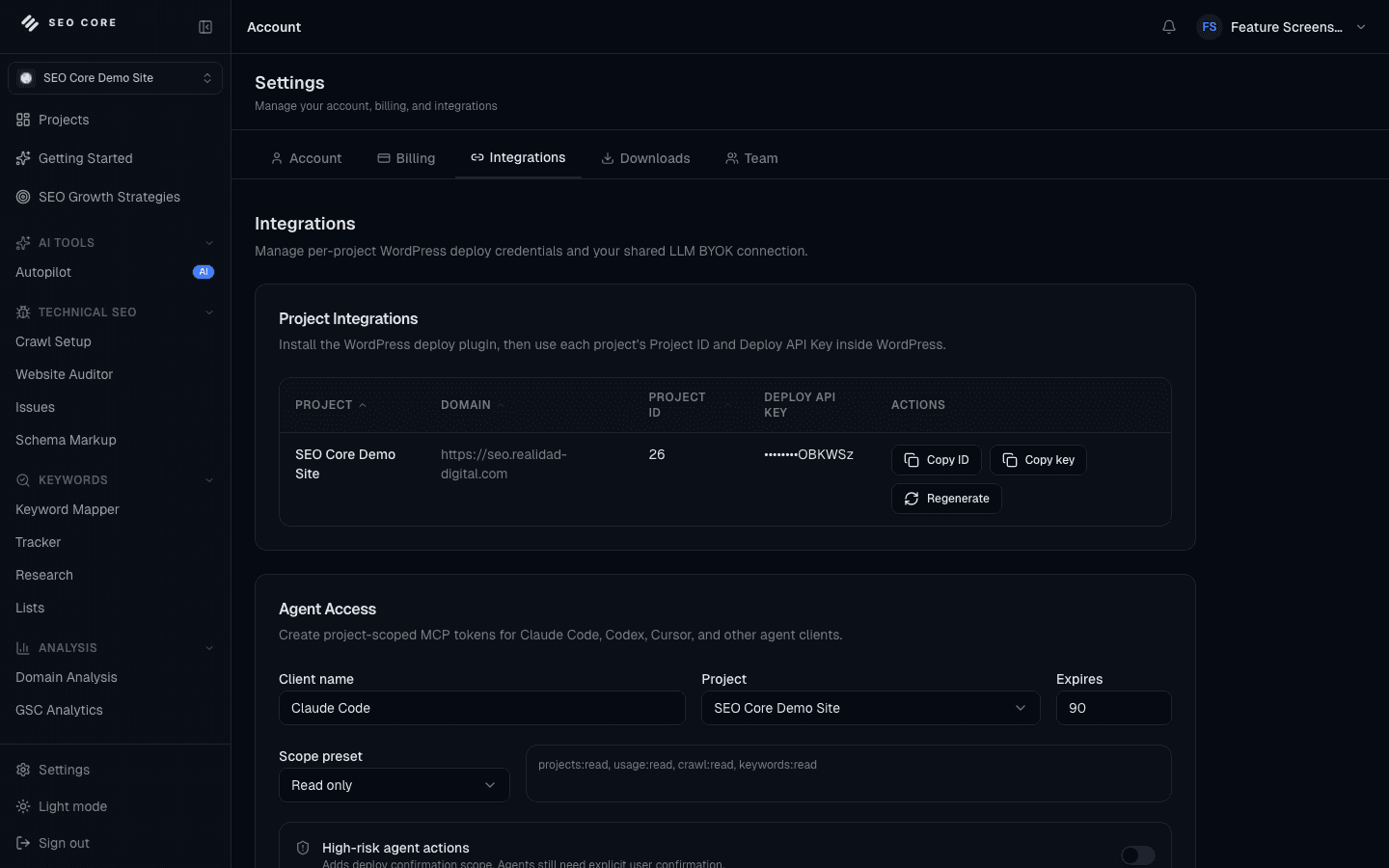
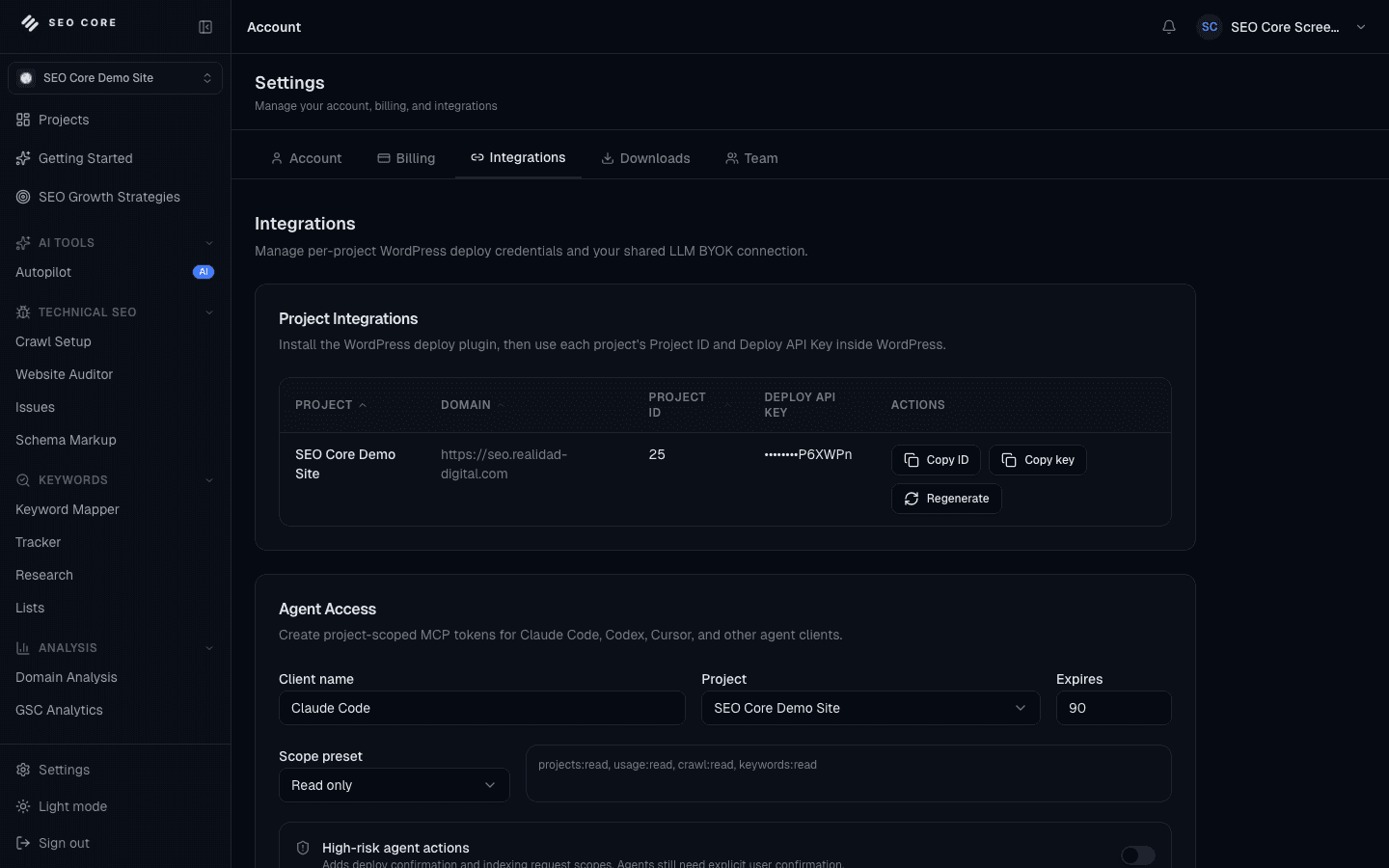
Connect Agent Workflows to SEO Core with Scoped MCP Access

Bring trusted SEO Core data and controls into modern agent workflows.

Give Claude Code, Codex, Cursor, and other MCP clients structured access to SEO Core context, local preflights, and guarded deploy workflows.

Simple workflow

Bring SEO Core context into your agent workflow while keeping project access, scopes, deploy proposals, and audit logs controlled by the platform.

Create scoped access

Generate Agent Access tokens with project-level permissions and start from read-only scopes.

Connect your client

Use the MCP package with Claude Code, Codex, Cursor, or another compatible client to expose trusted SEO tools.

Ground agent answers

Let agents inspect crawl issues, keyword mappings, project context, preflights, and reports through structured tools.

Explore feature
SEO Core MCP interface

Ready to turn SEO work into a repeatable workflow?

Compare plans, choose the right capacity, and bring auditing, prioritization, AI guidance, and deployment controls into one platform.